Original content

Protected by Copyscape Plagiarism Checker

Tuesday, November 8, 2016

Eclipse: Problem with new maven project : Error in pom or during build

When I created a new maven project, I received the following error.

Failure to transfer org.codehaus.plexus:plexus-io:pom:2.0.2 from https://repo.maven.apache.org/maven2

This is not the complete error message. But a part of it.

It looks like the maven plugin in eclipse was not resolving the dependencies. So, I built the newly created maven project using the stand alone maven tool which is not a plugin in eclipse (i.e., from the command prompt using "mvn clean install"). It resolved the dependency without issues. And a refreshing of the project inside eclipse has resolved the error indication in pom file.

Sunday, July 26, 2015

Windows 10 - DVD drive not displayed in File Explorer

Hi, I am using windows 10 preview edition. No doubt, there are many other people out there too trying this new version and may be facing my same problem.

My DVD drive was not displayed under file explorer and this was after I upgraded from windows 7 to windows 10. I tried around three solutions when I google. Below solution from the microsoft support webpage solved my problem. Hope this will solve yours too.

https://support.microsoft.com/en-us/kb/314060


Copy of the steps I followed from the above link is below,

Note To use this method, you must be logged on to Windows as an administrator. Or right click and select run as administrator when opening the regedit.exe

Microsoft has a warning for the users, so please be correct when updating the registry. Before you modify it, back up the registry for restoration.

To create the registry subkey,
 
  1. Type regedit in the Run box, then press Enter. If you are prompted for an administrator password or for a confirmation, type the password, or click Allow
  2. Locate the following registry subkey:
    HKEY_LOCAL_MACHINE\SYSTEM\CurrentControlSet\Services\atapi
  3. Right-click atapi, create new Key with the name Controller0.
  4. Right-click Controller0, create new DWORD(32-bit) Value with the name EnumDevice1.
  5. Right-click EnumDevice1 and Modify, Type 1 in the Value data box.
  6. Exit Registry Editor and restart.
 My problem got solved, hope yours will too ;-)

Sunday, February 15, 2015

Image resize in java - pass image as byte code and write the output byte code as image file

In this code, variable “byteImageValue” is the actual image byte code.

        byte[] byteResizedImageValue;
        try {
              ByteArrayInputStream inputStream = new ByteArrayInputStream(byteImageValue);
                     ByteArrayOutputStream baos = new ByteArrayOutputStream();
                     byte[] imageInByte = null
                     BufferedImage bufferedImage = ImageIO.read(inputStream);
                     int intResizeWidth = bufferedImage.getWidth()+25;
                     int intResizedHeight = bufferedImage.getHeight()+10;
                     BufferedImage resizedImage = new BufferedImage(intResizeWidth, intResizedHeight, BufferedImage.TYPE_INT_ARGB);
                     Graphics g = resizedImage.getGraphics();
                    
                     g.drawImage(bufferedImage, 0, 0, intResizeWidth, intResizedHeight, null);
               g.dispose();
                     ImageIO.write(resizedImage, "PNG", baos );
               baos.flush();
               imageInByte = baos.toByteArray();
               baos.close();
               byteResizedImageValue = imageInByte; 
              } catch (IOException objImageIOException) {
                     // TODO Auto-generated catch block
                     throw new ScriptException(generalErrorCode,
                    "Invalid image." + objImageIOException.getMessage());
              }

Wednesday, December 10, 2014

Installing maven plugin in Eclipse


  • Go to help – Install new software.
  • Add... pick a name with the above URL as Location.
  • Once the list loads, under "General Purpose Tools", check "m2e - Maven Integration for Eclipse".
  • Continue with the installation & restart.
Source: http://stackoverflow.com/questions/25255824/issue-faced-while-installing-m2e-on-eclipse

Saturday, February 1, 2014

GTA IV not starting showing a black cmd prompt

Check for minimum required directX version in the PC. Guess minimum version is 11. Then download and Install the "Microsoft Visual C++ 2005 SP1 Redistributable Package (x86)".  This may resolve the issue.

Best tamil virtual keyboard with word suggestions

Best Tamil virtual keyboard I would suggest is Google input. It's word suggestion is wonderful. Don't search anywhere! :-)

Monday, August 13, 2012

SIM CARD SLOT IN DELL XPS

Guess few of you would have searched for the way to use your SIM Card slot in Dell XPS or any other laptop devices(Check the manual for the slot to insert the SIM).

Having SIM Card slot is not enough to use the SIM Card for connecting to internet, you should check the availability of the WWAN(Wireless Wide Area Network) hardware in the device. Attached the snap of a Dell XPS15 showing the place where you can find the slot to install the device.


If the device is already install, you can use the SIM card slot right away after installing the necessary drivers. 

Sunday, October 2, 2011

Invalid block address while burning disc with nero

Invalid block address while burning disc with nero

Even me too faced the same problem, but now it is fixed.

I have goggled for at least an hour and end up with no solution. Some where it was mentioned that this may be because of the another writer which might be connected via USB.

It was also mentioned that is because of Nero. But actually there is no issues with the Nero. When I checked in the BIOS, there was an extra USB DVD burner. When I removed my USB modem, it was disappeared. Now the problem is solved, there is no issues in burning. You can also solve this problem by removing the driver of that unidentified DVD writer. Below the screen shot of the error which I got.

Thursday, September 1, 2011

Everything is fine in windows7 but no sound and you have some usb modem connected

Guess few people may face the problem of no sound in your speakers but everyting looks fine. Just check in the control panel under sound window. Check whether your speaker is set to default output device. For example if you have a usb modem and it have a earphone output facility, that might be set to default output device automatically on installation and sounds from your pc will be directed to this device eventhough it is not connected. Please refer the below screen shot for clarification.
sound settings from control panel

Saturday, February 26, 2011

Get paid for your response

I think most of you are aware of surveys. Yes, I am speaking about online survey's. You will be get paid for your response for the survey's, based on which some market decisions were made.

How it works?

If a new service or product is released by a big concerns, it will not release it blindly. Before releasing the product analysis of the minds of the receiver of the product or service is done.

How to analyze?

This is where market research companies comes in to play. These market research companies creates the questionnaire with the question which enables the market analyst to collect required information to do business analysis.

Then what is there for us?

This is our main part. Where the market research companies will collect the response for their questions, yes from us(Customer for the service or product). How they are able to collect response for their questions from us, to do this they will contact companies which are maintaining the details of the general public.

Based on the survey, whether the product is for youth, children, married...etc. the market research company will create the survey and send the links to the respondents and pay them for attending and providing the response.

Tuesday, January 25, 2011

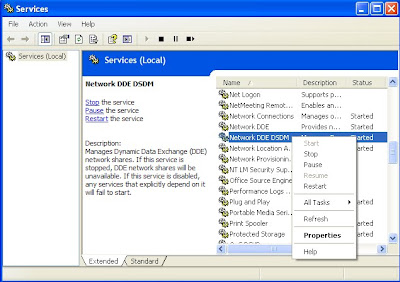
Enable Winchat in windows XP

It's an applications to chat with in the network...


Just type "winchat" in the "RUN"..You will get the chat window shown below.

Just click on the dial icon and select the name of the system you want to chat inside your network.

Here comes the problem...there may be no response at the receiving end...Just follow the below steps.

1. Open Control panel->Administrator tools->services.
2. In the right-pan of the Services window, enable "Network DDE DSDM" first and enable "Network DDE" after that.
3. After completing the above two steps, just restart your PC.

Saturday, January 1, 2011

Final year project ideas

Hi friends,

When I was doing my degree, I always have a will to do a great project(Computer related). But I was not able to think what to do.

Finally I submitted some scrap and scored the marks. But now I find a way to get ideas. Visit the following website, where requirements for projects are posted. You can find the one which matches your skill set and start implementing it.

http://www.freelancer.com/

You can also earn too...If you got the skills required.

Saturday, November 27, 2010

BSNL 3G data card Teracom H/W: v1.0 S/W: LW273 v1.2 with other network

I think it is easy to flash other 3G modems mainly Huawei to use network's other than the one for which the modem was provided.

But mine in 7.2Mbps teracom modem provided by BSNL. I was not able to use other network sim cards in windows. When I insert different sim card the application provided with the modem will rise error message.

What I did is tried in ubuntu. Just start your PC with your modem pluged into the USB, It will be automatically detected. Now change the settings according to the network and use.

If modem is not detected, Copy the contents of the virtual drive created in your windows while plugging the modem for the first time. You can find a folder with a name Linux, copy it and install in your ubuntu. After installing in ubuntu you may get error message, ignore it.

Now after installing the program in ubuntu, restart you PC. Now your modem will be detected.

Enjoy......This worked for me...............I Will let you know once I find a way in windows......Also let me know if there is already a way to use in windows......

Cheers....

Saturday, September 18, 2010

Sample confirmIT coding

Below is the sample code to know how coding will look like in confirmIT.

if( f('Q1').get() == '1' )
{
f('Q2').set('1');
}

  • In the above code f(‘Q1’) refers to the single choice question object having the question id ‘Q1’.
  • f() is used to refer the objects in the confirmIT.
  • f(‘Q1’).get() == ‘1’ means first choice of the single choice question is selected.
  • f(‘Q2’).set(‘1’);  this statement sets the first choice of the single question object haveing the question id ‘Q2’.

Wednesday, July 14, 2010

DataEnvironment connection already open problem (VB6.0)

IF DataEnvironment.connection_name.state <> 0 then

DataEnvironment.connection_name.close

DataEnvironment.connection_name.open

End if

DataEnvironment.dataenvirnoment_command_under_connection_name para1,para2….paran

Tuesday, July 6, 2010

What is the use of CONFIRMIT

It is SOS(Software as Service) kind of web service. We can use the tool only through the internet. It is used to generate online questionnaire to take surveys. Using the CONFIRMIT we can generate the questions of various types like single choice question, multi choice question and grid question.

We have objects in CONFIRMIT which are called nodes. We can drag the required nodes depending on the type of question we need. In the next post I will provide the screen shots for different type of questions.

Wednesday, June 23, 2010

Confirmit

What is it? It is a market research tool which helps in creating the questionnaire. It have build in objects and can be programmed. We can modify the flow of questions being asked, by programming. Conformit is a web service.

Browser – Problem in loading

If you find that everything about your internet settings are fine but still the pages still take time to load, then just clear your cookies and restart the browser.

Saturday, May 15, 2010

Stored procedure/SQL query of MS Access in VB.Net

Dim prov As String = "Microsoft.Jet.OLEDB.4.0"
Dim pass As String = "123"
Dim con As New OleDb.OleDbConnection("Provider=" + prov + ";Data Source=" + "F:\Perfect Engineering\Perfect Engineering\Perfect Engineering\bin\Debug\Perfect_Engineering.mdb;Jet OLEDB:Database Password=" + pass)
Dim cmd As New OleDb.OleDbCommand
Dim dr As OleDb.OleDbDataReader
con.Open()
cmd.Connection = con
cmd.CommandType = CommandType.StoredProcedure
cmd.CommandText = "delivery_pending"
dr = cmd.ExecuteReader
If dr.Read() Then
   MsgBox(dr(0))
End If

Saturday, May 1, 2010

SQL Query to sum and compare a field’s value based on relationship

Let the tables be,

Table: delivery_challan

primary key: dcno

Table: invoice_entry

Foreign key: dcno

dcno recqty
1 5
2 5
dcno desqty
1 2
1 3
2 3

Scenario: we have to sum the ‘desqty’ of the invoice_entry on ‘dcno’ wise and should compare with the ‘recqty’ of delivery_challan on ‘dcno’ wise and should show only the records of the ‘delivery_challan’ for which ‘recqty’ is greater than the sum of corresponding dcno’s ‘recqty’.

I am dam sure, you can’t understand my English. Just try the query and find the result.

SELECT * from delivery_challan where delivery_challan.recqty > (select sum(desqty) from invoice_entry where invoice_entry.dcno=delivery_challan.dcno);